Compliance Ledger
Pro Sub
The Compliance Ledger seals LiMon's observed license evidence into an Ed25519-signed hash chain. It preserves what was recorded when a day was sealed and records later changes as signed amendments, so audit reviewers can examine the evidence and its history.
Manage sealing under Admin → Settings → Compliance Ledger. The frontend Intelligence → Compliance Ledger panel provides verification and JSON export; Audit Defense explains the ledger's evidence context within a report.
What Is Sealed
Each daily seal commits evidence for usage, denials, monitoring coverage, and observed license inventory. Evidence is grouped by server and feature; usernames are not part of the sealed evidence.
The effective date identifies the day the evidence relates to, while the recorded cutoff identifies the observations available when it was sealed. Inventory reflects what LiMon observed at that cutoff. It does not reconstruct when a vendor-side entitlement change actually took effect.
The chain checks whether committed evidence has been altered and whether entries and signatures remain consistent. Coverage, amendments, key trust, and external receipts are reported separately. A valid chain alone does not establish that the license server reported accurately, that monitoring covered the whole period, or that observed inventory equals contractual entitlement.
Enable Evidence Sealing
Sealing is off by default and requires Professional with active maintenance (the subscription).
- Open Admin → Settings → Compliance Ledger with an Admin account or the admin API key.
- Enable Seal daily compliance evidence and choose Save Settings.
- Copy the Signing key fingerprint to a record outside the LiMon host, such as your audit records.
- Review Sealing Status after nightly consolidation has run.
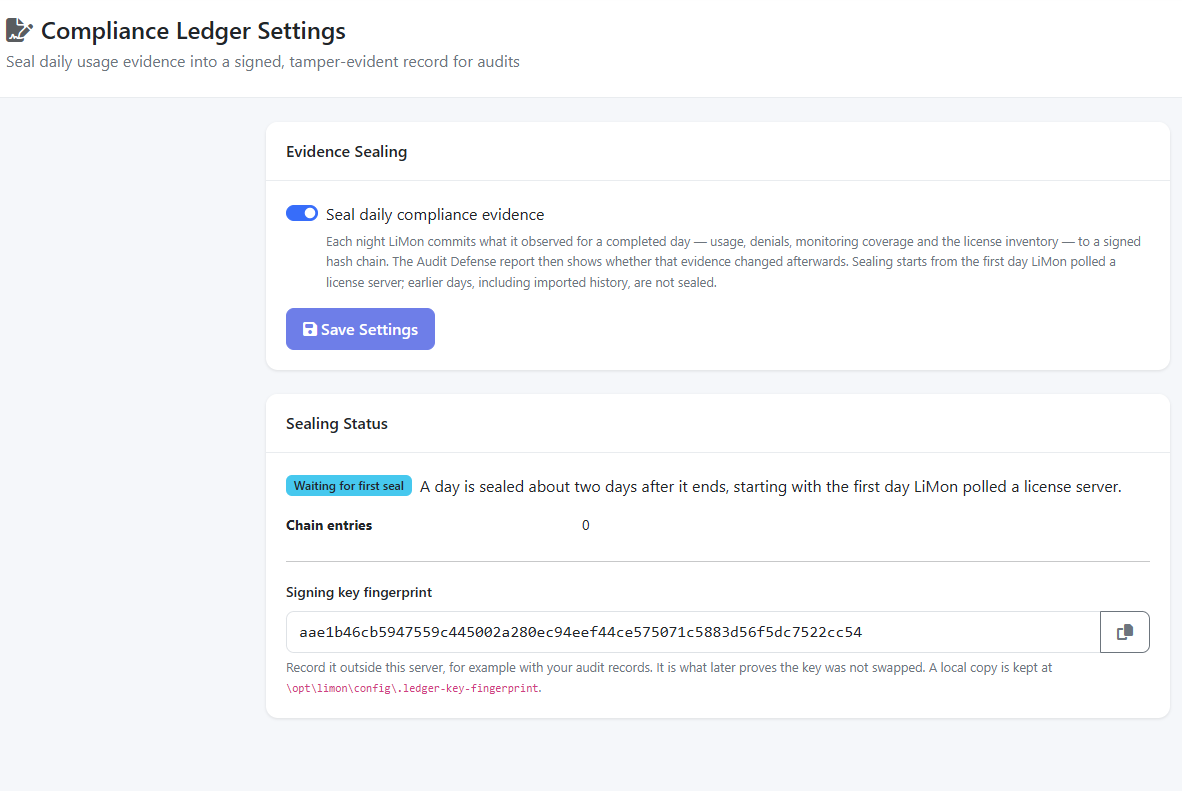
The API service creates the signing key when sealing is licensed and enabled. The nightly consolidator reads that key and seals eligible days after the finalization delay: 36 hours by default, followed by the next successful nightly run. The UI describes this as about two days after a day ends.
Sealing starts with the first day LiMon polled a license server. Earlier dates, including history brought in by log import, are not sealed. A day is eligible only once consolidation has completed every day up to and including it.
Read the Sealing Status
| Status | Meaning and next step |
|---|---|
| Waiting for first seal | Sealing is enabled but no eligible day has been sealed yet. Allow for the finalization delay and nightly run. |
| Sealing | Review Sealed through and Last seal recorded to see how far sealing has progressed. |
| Behind schedule | Eligible days remain unsealed. Check that nightly consolidation completes successfully. |
| Paused | Maintenance is inactive, so no new days are sealed. The setting is retained and sealing resumes after renewal. |
| Off | New daily seals are disabled. Existing sealed days remain protected and changes to them continue to be recorded as amendments. |
Chain entries counts all entry types, including amendments and key changes; it is not a count of monitored days.
If sealing falls behind, check the consolidator's last run and logs, resolve the reported problem, then run it again. LiMon catches up eligible missed days automatically. For package installations, inspect limon-consolidator.timer and limon-consolidator.service; in Docker, check the scheduler's consolidation run. Full service procedures are in the shipped /opt/limon/docs/operational-manual.pdf.
Late Data and Corrections
Log imports and corrections affecting an already-sealed day append signed amendments. The original seal remains available, so a reviewer can see what was known at sealing time and what changed later. Late session closes and server lifecycle changes can also produce recorded amendments.
The nightly check records an unexplained divergence when underlying evidence changes without a declared cause. Investigate that finding and its provenance. Changing a denial classification rule alone is not a change to sealed evidence.
Verification distinguishes integrity findings from completeness and assurance information:
| Result | How to read it |
|---|---|
| Invalid chain/signature or altered evidence | An integrity finding affecting committed material; investigate before relying on the export. |
| Partial or unknown coverage | The monitored evidence covers less than a complete period, or completeness cannot be established. |
| Recorded amendments | Later information is part of the signed history. Read the reason and provenance. |
| Missing or not-retained evidence | Some committed material is unavailable. Review the retention history and export scope. |
| Untrusted key or local-only assurance | The result lacks the independent trust or external support needed for stronger assurance. |
Verify and Export
On the Intelligence → Compliance Ledger panel, use Deep Verify to inspect the ledger and Export JSON to save a self-contained bundle. Keep the tools/ledger_verify.py shipped with the same LiMon release alongside the export.
For independent verification, copy the verifier and bundle to another machine with Python and cryptography, then run:
This standalone verifier rebuilds the canonical evidence, checks hashes and signatures, and validates chain and key continuity. The independently recorded fingerprint supplies the key trust: an export containing its own public key cannot by itself prove that the key and chain were never replaced together.
For a quick byte-level check, the browser ledger verifier can inspect an export locally in the browser. Use the release-matched standalone verifier for the full canonicalization check.
Exports are limited to 64 MiB by default (compliance.ledger.max_export_bytes). If a request returns 413 Payload Too Large, request a smaller range with the export API's start_date and end_date parameters. Each slice carries the adjacent chain material needed to verify continuity. See the API Reference.
External Checkpoints
For evidence outside the installation, obtain the signed chain-head receipt from GET /api/v1/system/compliance-ledger/checkpoint, store it in a write-once system you control, and record that system's receipt through POST /api/v1/system/compliance-ledger/checkpoint-receipt using administrative credentials.
LiMon reconciles the recorded receipt with the signed checkpoint and reports EXTERNAL_RECEIPT_RECORDED. An auditor must still verify the receipt with its issuing system. LiMon does not send the checkpoint to an external service automatically, so this workflow also supports air-gapped installations.
Protect Keys and Evidence
Back up .ledger-signing-key and .ledger-key-fingerprint with the database and restore them as one set. The default signing-key path is /opt/limon/config/.ledger-signing-key. Keep the independently recorded fingerprint outside that backup's host.
The API owns key creation and rotation. Do not regenerate or replace the key file to clear a status warning; recover the matching backup or use the supported rotation operation when an intentional key change is required. Rotation records the handover in the chain.
Evidence is retained indefinitely by default (compliance.ledger.evidence_retention_days: null). Pruning changes what later verification can establish, so apply an explicit retention policy. Only the sealing switch is managed in this Admin settings page; key paths, finalization delay, export limits, and evidence retention remain file-managed settings.
See Also
- Admin UI — where to find operational settings
- Reports — Audit Defense views and PDF generation
- Configuration Reference — configuration sources and overrides
- Authentication — roles and administrative access