Reports
LiMon Intelligence reports turn monitored license data into live web views, PDF artifacts, and scheduled report runs. They are meant for estate review, application ownership, site comparisons, savings analysis, audit preparation, and finance-oriented allocation workflows.
Reports use the same DB-backed model configured in the Admin UI: servers, applications, feature mappings, sites, AD/LDAP enrichment, privacy settings, and cost data. When those inputs are incomplete, reports still run, but sections that depend on business context may show gaps or unallocated rows.
Every report needs an active subscription. During an evaluation, reports cover data from the evaluation's start date onward, even if you imported older logs.
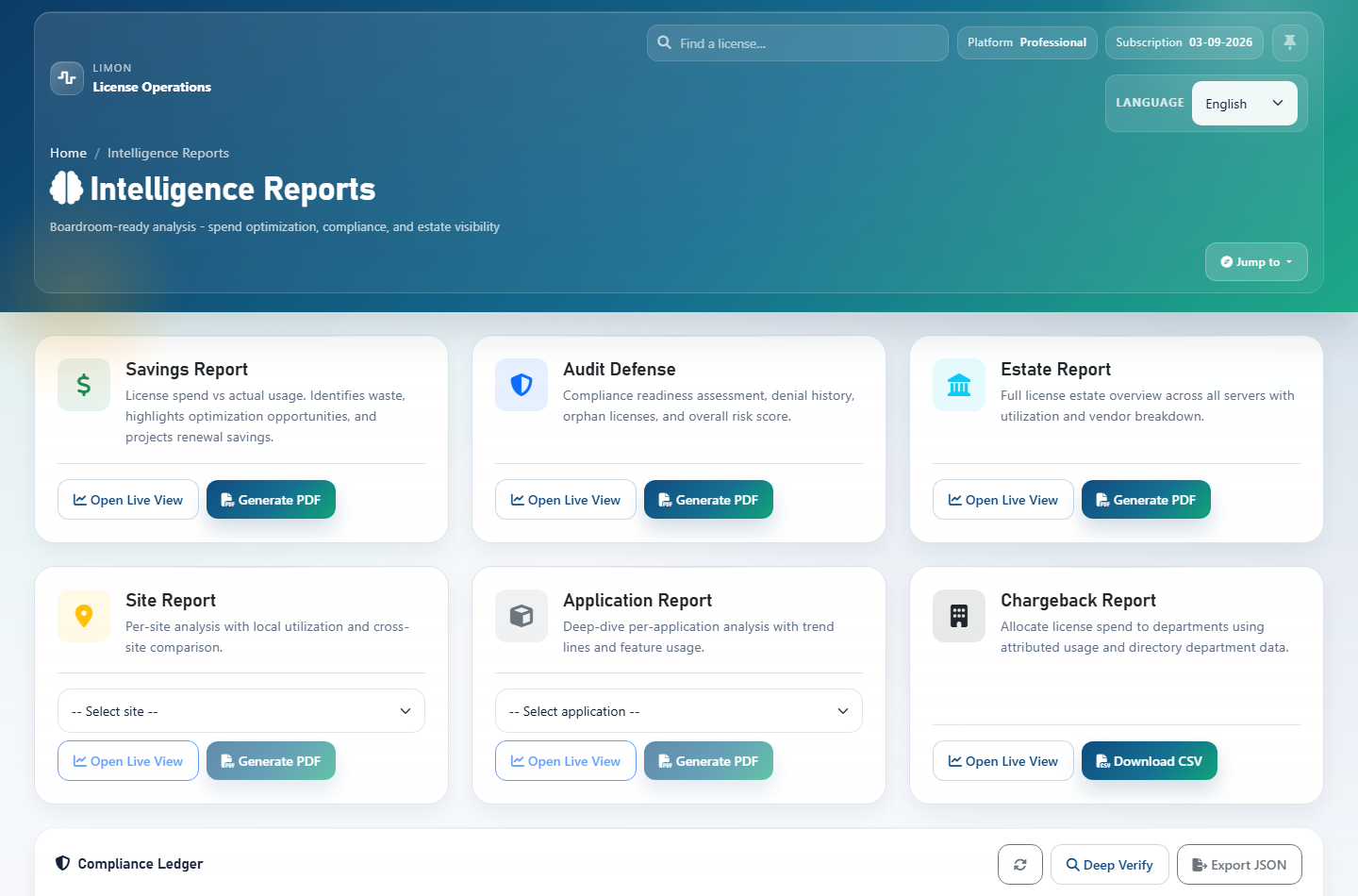
Report Types
| Report Sub | Web view | Useful for | |
|---|---|---|---|
| Estate | Yes | Yes | Estate-wide application usage across all applications defined in LiMon. |
| Application | Yes | Yes | A selected application, including related features, users, utilization, and demand. |
| Site | Yes | Yes | A selected site/location, with rollups based on site assignments. |
Savings (money) |
Yes | Yes | Underused capacity, unused features, renewal exposure, vendor summary, and cost-savings opportunities. Requires useful application/feature cost data for best results. |
| Audit Defense | Yes | Yes | Compliance posture over a selected period, including capacity, denials, overdraft signals, expiring licenses, and audit-risk indicators. |
| Chargeback Pro | Yes | CSV | Department allocation and finance export. Requires advanced analytics, cost data, and department context from AD/LDAP or maintained mappings. |
PDF-capable report types are estate, app, site, money, and audit. Chargeback is intentionally a live view plus JSON/CSV export rather than part of the shared PDF artifact path.
Sample PDFs of all five, with a walkthrough of what each one contains, are at limonops.com/resources/sample-reports/.
Live Web Views
Live report views are the interactive version of each report. They are lighter than PDF generation and are the best place to inspect current report data before producing or regenerating a PDF.
The examples below show partial contents of the Audit Defense live view: the top-level compliance posture, denial pressure, application compliance portfolio, and priority actions that help prepare evidence for audit conversations.
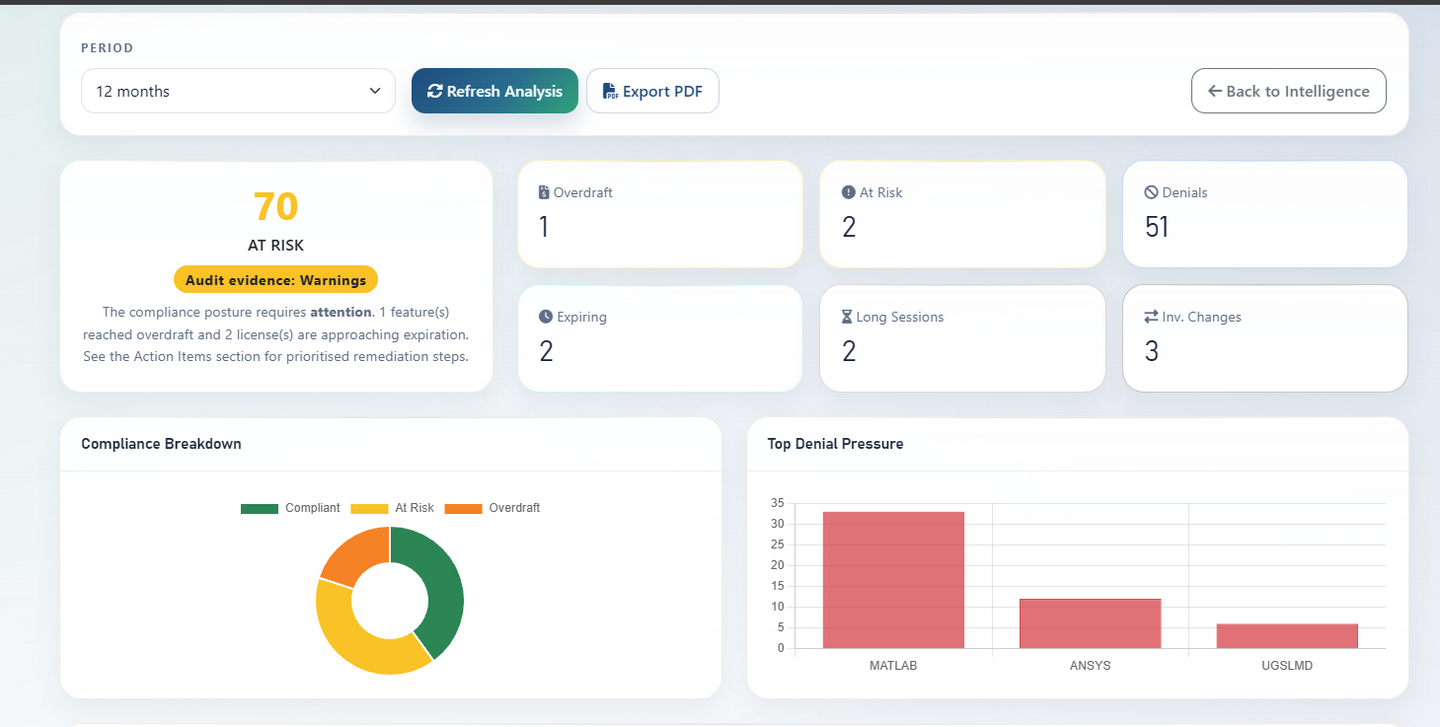
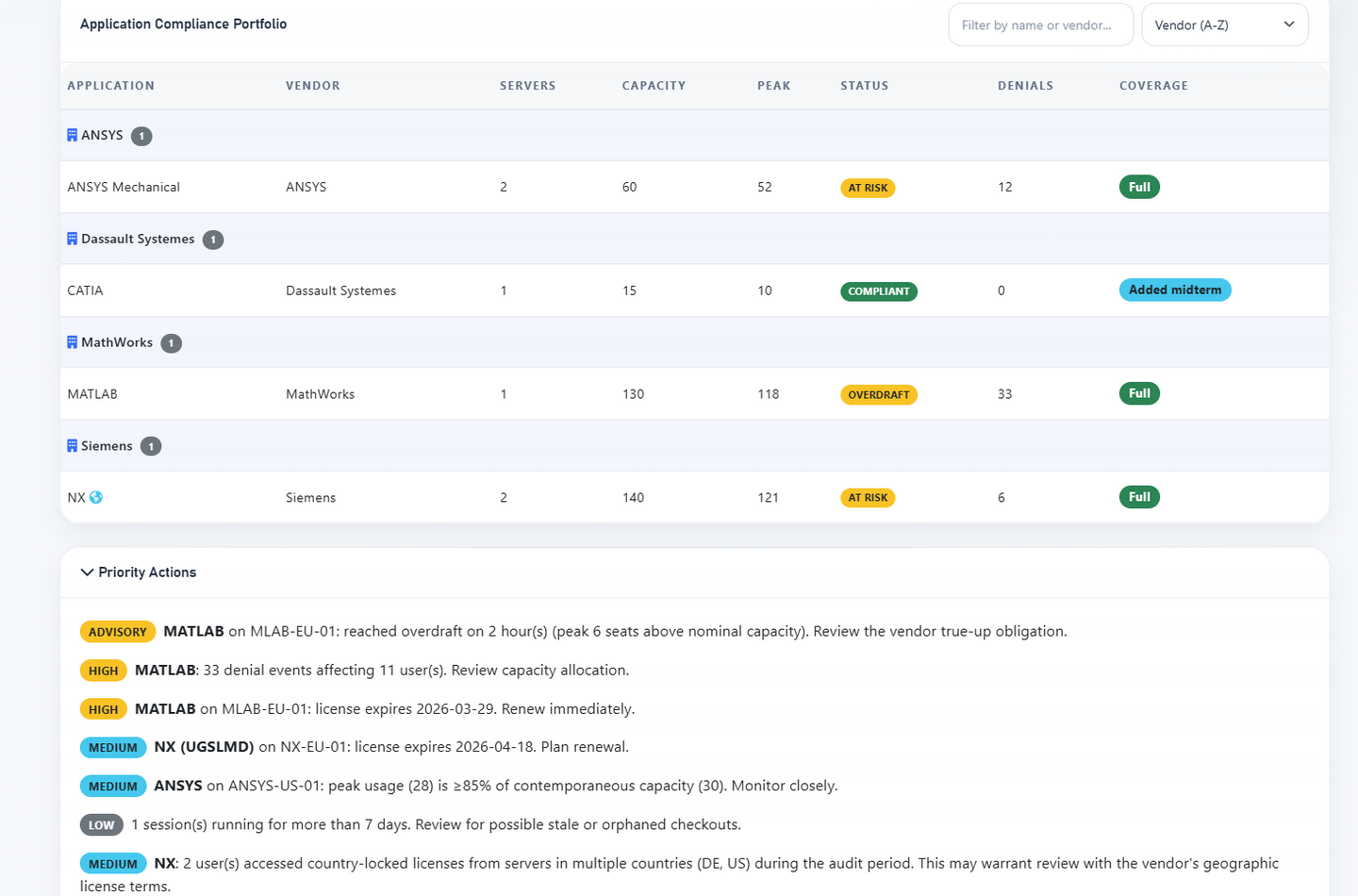
Open a live report from the Intelligence overview, choose the report family, and select the relevant application, site, period, or privacy option when the report needs one. The Intelligence overview shows whether a PDF of each report already exists and offers it for download, so check there before generating another.
Audit Defense also interprets Compliance Ledger evidence when available: integrity, monitoring coverage, recorded amendments, key trust, and external receipts. Use the dedicated ledger guide for sealing setup, verification, export, and key handling.
PDF Generation
PDF generation is asynchronous. When a user clicks Generate PDF or Regenerate, LiMon queues a durable job and a report worker renders the PDF outside the web request. Repeated requests for the same exact report attach to the same live job, and the newest successful exact-match artifact is surfaced by default.
A few safeguards keep generation predictable:
- At most five on-demand reports can be queued or running at once. Beyond that, LiMon asks you to wait for one to finish. Joining a report that is already being generated, and scheduled reports, don't count. Administrators can change the limit with
reports.jobs.max_inflight_ad_hoc_jobs. - A report that runs longer than 30 minutes is stopped and marked failed (
reports.jobs.job_timeout_minutes). - Each PDF is checked before it is published, so a failed render never replaces the last good copy.
Generated PDFs include bookmarks for each section, so you can jump around them from your PDF viewer's outline.
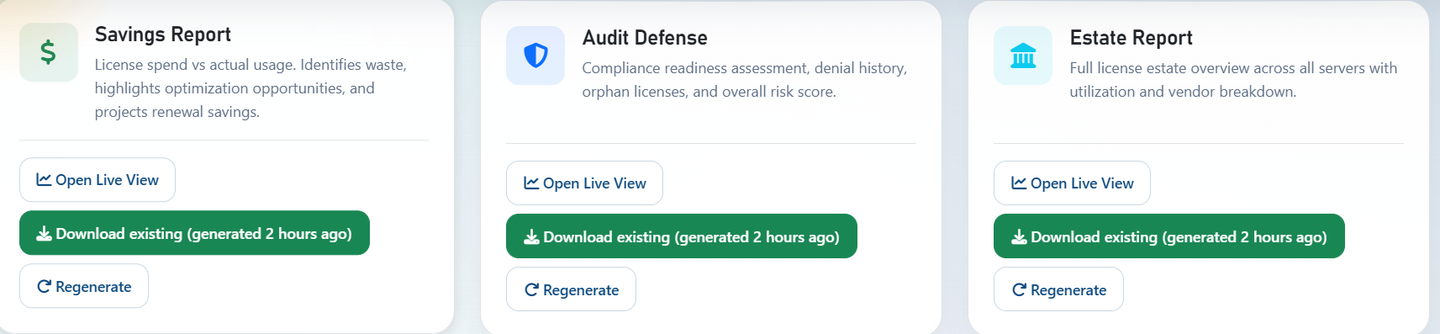
If an exact matching PDF already exists, the report page can offer Download existing instead of forcing a new generation. Use Regenerate when the underlying data or settings have changed and a fresh artifact is needed.
Scheduling
Schedules use the same durable queue as manual PDF generation. The scheduler checks due schedules every hour, queues the matching report, and emails it when SMTP and recipients are configured.
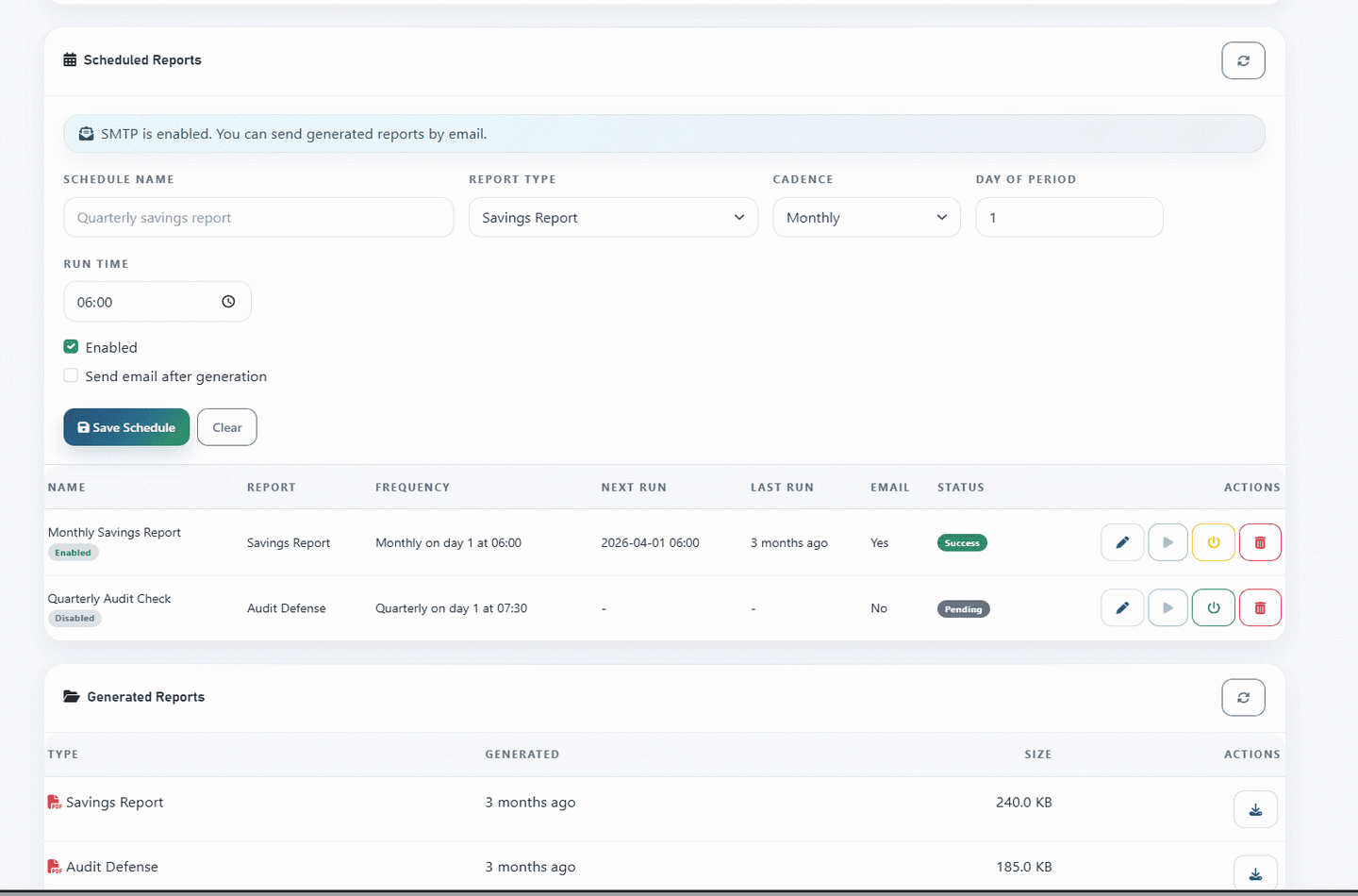
Use schedules for recurring review packs such as monthly estate reviews, quarterly audit preparation, or yearly savings analysis. Valid cadences are monthly, quarterly, and yearly. A schedule keeps its original day and time: a late or missed run doesn't shift the ones after it.
Under Email Recipients, type email addresses, or use Add account and Send to me to add LiMon accounts. Account recipients follow their current email address and their own notification mutes. Email delivery needs SMTP configured under Admin → Settings → Notifications; see Notifications.
Settings And Storage
Report settings are managed from the Admin UI/API, with defaults.yml providing shipped defaults. The most visible operational settings are:
| Setting | Default | Notes |
|---|---|---|
reports.output.directory |
/opt/limon/reports/intelligence |
Source of truth for generated PDF artifacts. Use an absolute path. |
reports.retention_days |
90 |
Old PDF files and superseded artifact rows are cleaned up after the retention window. |
reports.money.default_period_months |
12 |
Default Savings analysis window. |
reports.money.currency |
EUR |
Single configured currency used by money-oriented report output. |
reports.audit.default_period_months |
12 |
Default Audit Defense analysis window. |
reports.jobs.max_inflight_ad_hoc_jobs |
5 |
On-demand PDF reports queued or running at once. Scheduled reports are exempt. |
reports.jobs.job_timeout_minutes |
30 |
A report running longer than this is stopped and marked failed. |
privacy.mask_usernames_default |
false |
Default privacy mode for reports and related API payloads. |
API For Automation
Most users generate and schedule reports from the frontend. Use the API when you need automation, scripting, integration with another portal, or external report retrieval.
Scripts should authenticate with the admin API key, which works in every access mode:
When sign-in is enabled, browser sessions need these permissions:
| Calls | Permission |
|---|---|
| Live views and the Chargeback export | data.read (Viewer) |
| Status, artifact lookup, list and download | reports.read (Viewer) |
| Generate a PDF | reports.generate (Operator) |
| Schedules | reports.schedule (Operator) |
Live-view endpoints:
| Endpoint | Notes |
|---|---|
GET /api/v1/reports/view/estate |
Optional mask_usernames=true. |
GET /api/v1/reports/view/app?application_id=<id> |
Select the application by application_id. app_name also works when exactly one deployed application has that name. Optional mask_usernames=true. |
GET /api/v1/reports/view/site?site_name=<name> |
site_name is required. Optional mask_usernames=true. |
GET /api/v1/reports/view/money?period_months=12&safety_margin=0.10 |
period_months and safety_margin are optional; configured defaults apply when omitted. |
GET /api/v1/reports/view/audit?period_months=12 |
period_months is optional; configured defaults apply when omitted. |
GET /api/v1/reports/view/chargeback?period=quarter |
Also accepts period_months=1, 3, 6, or 12. |
GET /api/v1/reports/chargeback?format=csv&period=quarter |
Finance-oriented CSV export. Use format=json for API consumers. |
Generate a PDF:
curl -X POST "http://your-limon-host/api/v1/reports/generate" \
  -H "X-API-KEY: <api-key>" \
  -H "Content-Type: application/json" \
  -d '{
    "type": "money",
    "params": {
      "period_months": 12,
      "safety_margin": 0.10
    }
  }'
If five on-demand reports are already queued or running, LiMon answers 429; retry after one finishes. Otherwise, poll the queued job:
Resolve an existing exact-match artifact before generating another one:
curl "http://your-limon-host/api/v1/reports/artifact?type=money&period_months=12&safety_margin=0.10" \
  -H "X-API-KEY: <api-key>"
Download the returned PDF artifact:
curl -o report.pdf "http://your-limon-host/api/v1/reports/download/<filename>" \
  -H "X-API-KEY: <api-key>"
Useful params values:
| Report type | Params |
|---|---|
estate |
{} for PDF generation. Live views also accept mask_usernames=true as a query parameter. |
app |
{"application_id": 7}, or {"app_name": "MATLAB"} when the name is unique. Live views also accept mask_usernames=true as a query parameter. |
site |
{"site_name": "US-NYC"}. Live views also accept mask_usernames=true as a query parameter. |
money |
Optional period_months, safety_margin. |
audit |
Optional period_months. |
Create a monthly Estate PDF schedule:
curl -X POST "http://your-limon-host/api/v1/reports/schedules" \
  -H "X-API-KEY: <api-key>" \
  -H "Content-Type: application/json" \
  -d '{
    "name": "Monthly Estate Review",
    "report_type": "estate",
    "report_params": {},
    "cadence": "monthly",
    "run_time": "06:30",
    "day_of_month": 1,
    "enabled": true,
    "email_enabled": true,
    "email_recipients": "licenses@example.com"
  }'
email_recipients is a comma-separated list. Each entry is an email address, or account:<id> for a LiMon account.
Schedule endpoints:
| Method | Endpoint | Purpose |
|---|---|---|
GET |
/api/v1/reports/schedules |
List schedules and SMTP readiness. |
POST |
/api/v1/reports/schedules |
Create a schedule. |
PUT |
/api/v1/reports/schedules/<id> |
Update a schedule. |
DELETE |
/api/v1/reports/schedules/<id> |
Delete a schedule. |
POST |
/api/v1/reports/schedules/<id>/run-now |
Queue the schedule immediately. |
For a broader endpoint inventory, see the API Reference.